
Workflows and processors
Understanding Cyoda JSON workflow configurations.
Overview
Section titled “Overview”Cyoda workflows define finite, distributed state machines that govern the lifecycle of business entities in an event-driven environment. Each entity progresses through a sequence of states based on defined transitions, criteria, and processing rules.
The platform supports adaptable entity modeling, allowing business logic to evolve through configuration rather than implementation changes. Workflows declare the set of states, valid transitions, and associated processing steps while preserving immutable persistence for auditability.
Workflow Architecture
Section titled “Workflow Architecture”Core Components
Section titled “Core Components”- States: Lifecycle stages of an entity
- Transitions: Directed changes between states
- Criteria: Conditional logic for transition eligibility
- Processors: Executable logic triggered during transitions
Configuration Schema
Section titled “Configuration Schema”You can find the workflow schema in the API reference. See the workflow import endpoints for complete schema specifications. Here we explain the structure and meaning of each element.
Workflow Object
Section titled “Workflow Object”{ "version": "1.4", "name": "Workflow Name", "desc": "Workflow description", "initialState": "StateName", "active": true, "criterion": {}, "states": {}}Attributes
Section titled “Attributes”version: Workflow schemaMAJOR.MINORversion. The current version is"1.4"(cyoda-go v0.8.4); the server accepts"1.1"through"1.4"and stamps the current version on export. Malformed values such as"1"or"1.0"are rejected at import. Runcyoda help workflows schema-versionfor the authoritative supported range.name: Identifier for the workflow. Must be unique per entity model.desc: Detailed description of the workflowinitialState: Starting point for new entitiesactive: Indicates whether the workflow is activecriterion: Optional criterion for selecting which workflow applies to a given entity. Uses the same condition types as transition criteria (simple, lifecycle, group, function). When multiple workflows are defined for a model, the platform evaluates each workflow’s criterion against the entity to determine which workflow governs it.states: Map of state names to state definitions
Multiple Workflows per Model
Section titled “Multiple Workflows per Model”An entity model can have multiple workflows, each with its own criterion at
the workflow level. This allows different processing paths for different
categories of entities within the same model.
The engine selects the workflow on every call, and it caches nothing
between calls. Five operations select a workflow: entity creation, a named
transition, a loopback re-evaluation, a scheduled transition firing, and
GET /entity/{entityId}/transitions.
The engine applies these rules in order:
- Read the workflows in stored declaration order. Storage keeps the order of
the most recent import, and
MERGEadds new workflows at the end. - Skip each workflow whose
activeflag isfalse. Selection ignores an inactive workflow, whatever its criterion. - Evaluate the
criterionof each active workflow against the entity payload and the lifecycle metadata. Anullor absent criterion always matches. - Select the first active workflow whose criterion matches. The engine does not read the later workflows.
- If no active workflow matches, use the embedded default workflow. The engine
adds a warning to the response body and writes a log line that carries
reason=no_criterion_matched.
To make a workflow a catch-all, place it last in the import array and give it no criterion. An active workflow declared after it is unreachable.
The engine audits selection under the transaction that drives the call. It
records a WORKFLOW_SKIP event for each skipped workflow, with the rejection
reason of the criterion, and a WORKFLOW_FOUND event for the selected one.
GET /entity/{entityId}/transitions is a read and records no event.
Annotations
Section titled “Annotations”Workflows, states, and transitions each accept an optional annotations
object — arbitrary client-owned JSON metadata that the engine stores
and round-trips faithfully but never interprets. Use it to attach
concerns that belong to your application rather than the state machine:
display labels and UI hints, permitted roles for application-level RBAC,
or routing tags consumed by your own tooling.
{ "version": "1.4", "name": "Payment Request Workflow", "initialState": "INVALID", "active": true, "annotations": { "ui": { "color": "#0aa7c2", "icon": "payment" }, "rbac": { "editRoles": ["payments-admin"] } }, "states": { "INVALID": { "annotations": { "label": "Needs validation" }, "transitions": [] } }}Each annotations value must be a JSON object and is capped at 64 KB
per field. The engine never reads these values; they are yours to
produce and consume.
As of workflow schema 1.2, the same annotations bag extends to the two elements that previously lacked it:
- Processors carry an embedded
annotationsobject. - Criteria carry a sibling
criterionAnnotationsobject on the workflow and on each transition — the criterion tree itself round-trips verbatim and is never parsed to attach metadata.
Two well-known optional keys are recognised uniformly across all five element types (workflow, state, transition, processor, criteria) for renderer and condition-builder use:
displayName— a short human label;description— a longer explanation.
The same rules apply everywhere: each value is a JSON object, capped at 64 KB, stored and re-emitted compacted, and never interpreted by the engine. Processor annotations are additionally stripped before dispatch and never reach compute members. This is an additive change — every existing 1.1 payload remains valid.
Import and Export
Section titled “Import and Export”Workflows are managed via import and export API endpoints on the entity model. The import request supports three modes that control how existing workflows are reconciled with the payload:
MERGE(default): Incremental update. Workflows with matching names are updated; unspecified workflows remain unchanged.REPLACE: Removes all existing workflows for the entity model and retains only the imported ones. Also deletes all unused processors and criteria.ACTIVATE: Similar to REPLACE, but deactivates (rather than deletes) existing workflows and transitions not included in the import. Unused processors and criteria are preserved.
See API reference for endpoint details and the full request/response schemas.
Strict validation
Section titled “Strict validation”From cyoda-go v0.8.1 the import endpoint validates payloads strictly and rejects the whole request rather than silently absorbing mistakes. A payload is rejected when it:
- declares a schema
versionoutside the supported range (currently"1.1"–"1.4") or malformed such as"1"/"1.0"(rejected withWORKFLOW_SCHEMA_VERSION_UNSUPPORTED); - carries unknown or misspelled fields (e.g.
transtions); - references a dangling state or reuses a name;
- relies on an empty array to mean “leave unchanged” in
REPLACEorACTIVATEmode — an empty array now deletes.
Regenerate any import payloads authored against the older, lenient contract before upgrading.
States
Section titled “States”States describe lifecycle phases for entities. Names must start with a letter and use only alphanumeric characters, underscores, or hyphens.
Format
Section titled “Format”"StateName": { "transitions": []}Special States
Section titled “Special States”- Initial state: The initial state of a new entity
- Terminal States: States with no outgoing transitions
Transitions
Section titled “Transitions”Transitions define allowed movements between states, optionally gated by conditions and supported by executable logic.
Format
Section titled “Format”{ "name": "TransitionName", "next": "TargetState", "manual": true, "disabled": false, "criterion": {}, "processors": [], "schedule": {} // one of delayMs | function}Attributes
Section titled “Attributes”name: Name of the transition (required)next: Target state code (required)manual: Determines if the transition is manual or automated (required)disabled: Marks the transition as inactivecriterion: Optional condition for eligibilityprocessors: Optional processing stepsschedule: Optional timer that fires the transition automatically — see Scheduled transitions. Mutually exclusive withmanual: true.
Manual vs Automated Transitions
Section titled “Manual vs Automated Transitions”Transitions may be either manual or automated, and are guarded by criteria that determine their eligibility. When an entity enters a new state, the first eligible automated transition is executed immediately within the same transaction. This continues recursively until no further automated transitions are applicable, resulting in a stable state. Each transition may trigger one or more attached processes, which can run synchronously or asynchronously, either within the current transaction or in a separate one. This forms the foundation for event flow automation, where processors may create or mutate entities in response, allowing a single transition to initiate a cascade of events and function executions across the system. CYODA_MAX_STATE_VISITS configures the per-state visit limit within a single cascade (default 10). A separate hard-coded safety cap of 100 steps limits total cascade depth across all states, preventing runaway automatic-transition chains.
Scheduled transitions
Section titled “Scheduled transitions”A third kind of transition fires on a timer. Give a transition a schedule
object and it fires on its own at a computed time, driven by a background
scheduler independently of any API call or cascade. Timers are durable, stored
by the backend (memory, SQLite, or PostgreSQL) and armed or cancelled
atomically with the entity write that triggered them.
Use it for deadlines and delays that belong to the domain: auto-close a ticket after 24 hours of inactivity, escalate an unpaid invoice at its due date, expire a reservation, or poll an external system on a fixed cadence.
There are two timing modes, and exactly one of them is required whenever
schedule is present. schedule is also mutually exclusive with
manual: true — a scheduled transition is by definition not manually fired.
Static timing — the same delay for every entity
Section titled “Static timing — the same delay for every entity”delayMs fires the transition delayMs after the entity enters the source
state:
{ "name": "AutoClose", "next": "Closed", "manual": false, "schedule": { "delayMs": 86400000, "timeoutMs": 600000 }}delayMs(integer, required in this mode) — milliseconds between source-state entry and the scheduled time. Must be greater than0.timeoutMs(integer, optional) — how late the scheduler may still pick the timer up before giving up. It is not a second delay: it measures lateness past the scheduled time, independent ofdelayMs. Absent means no limit; an explicit0is strictest, dropping the timer on any lateness at all.
Per-entity timing — a Function callout
Section titled “Per-entity timing — a Function callout”A static delay fires every entity at the same offset. When the deadline lives on
the entity — an expiresAt field, a per-customer SLA, a user-chosen reminder —
use function instead, which asks a compute node to compute the time per
entity:
{ "name": "Escalate", "next": "Escalated", "manual": false, "schedule": { "function": { "name": "compute-escalation-time", "resultKind": "Schedule", "calculationNodesTags": "escalation-service", "attachEntity": true } }}name(required) — the registered function name.resultKind(required) — must be"Schedule".calculationNodesTags(required) — comma-separated routing tags, exactly as for a processor or criterion.attachEntity(optional, defaulttrue) — whether the entity payload is attached to the request.context(optional) — a pass-through string forwarded verbatim as the request’sparameters.responseTimeoutMs(optional) — response timeout for this callout.
This is a Function callout — a third shape alongside Processor (mutates the
entity) and Criterion (returns a boolean) that returns a declared typed value
and mutates nothing. See
handling function requests for the compute-node
side. The node replies with a Schedule result:
{ "fireAfterMs": 3600000, "expireAfterMs": 600000 }- Fire time (required) — exactly one of
fireAt(absolute epoch-ms) orfireAfterMs(relative to arm time). A time already in the past is not an error; the transition is simply due immediately. - Expiry (optional) — at most one of
expireAt(absolute) orexpireAfterMs(relative to the resolved fire time, not to arm time). Both absent means no expiry. A resolved expiry after the fire time becomes thetimeoutMslateness window — the gap between the two.
How the timer behaves
Section titled “How the timer behaves”Both timing modes share the same engine behaviour.
Arming happens on every settled write. The timer is armed when the entity enters the source state — and re-armed on every subsequent write that leaves it in that state, including a routine data update or a self-loop. Each re-arm fully replaces the previous scheduling decision, and in function mode it makes a fresh callout.
The criterion is evaluated exactly once, at fire time. A true (or absent)
criterion fires the transition normally — processors run, the state advances,
TRANSITION_MAKE is recorded. A false criterion declines it: the entity
stays put and the timer is not retried. This is a deliberate one-shot, not a
poll.
Lateness is bounded by timeoutMs. If the scheduler picks up a due timer
more than timeoutMs past its scheduled time, the timer is dropped without
evaluating the criterion and the transition never fires. With no timeoutMs,
there is no upper bound — it fires whenever it is eventually picked up.
A scheduled transition is not manually fireable. Naming one in an explicit
transition request returns 400 TRANSITION_NOT_FOUND, with a detail explaining
that it fires automatically. To allow early firing, give the state an ordinary
manual transition alongside the scheduled one.
Everything is audited. Arming, firing, expiry, and cancellation each emit a
dedicated event — SCHEDULED_TRANSITION_ARM, SCHEDULED_TRANSITION_FIRE
(alongside the ordinary TRANSITION_MAKE), SCHEDULED_TRANSITION_EXPIRE, and
SCHEDULED_TRANSITION_CANCEL when the entity leaves the source state before the
timer fires. A loopback that re-arms the same state emits only ARM.
One-shot, or polling?
Section titled “One-shot, or polling?”Since the criterion is evaluated once per fire, there is no built-in retry-until-true. Three shapes cover the common cases:
- A deadline gate — a criterion on the scheduled transition. At the
deadline, fire if the condition holds, otherwise abandon. A
falsecriterion is a deliberate decline. - A recurring heartbeat — an unconditional scheduled cycle
(
S1 →scheduled→ S2 →scheduled→ S1), which fires everydelayMs, forever, for every entity in the cycle. - Poll until a condition holds — an unconditional scheduled tick into a state whose ordinary (non-scheduled) transitions carry the condition and exit when it is met. The retry loop lives in the workflow structure, not in the timer.
The last two are cycles, and the import-time cycle detector rejects unguarded
automated cycles by default — a delayed cycle is still a cycle. Set
allowCycles: true on the import request body to accept one:
{ "importMode": "REPLACE", "allowCycles": true, "workflows": []}Operational configuration
Section titled “Operational configuration”The scheduler runs on a coordinator elected across the cluster (by default the
member with the lowest node ID), which scans for due timers and distributes them
to peers. Seven environment variables tune it —
CYODA_SCHEDULER_ENABLED, CYODA_SCHEDULER_SCAN_INTERVAL,
CYODA_SCHEDULER_BATCH_SIZE, CYODA_SCHEDULER_DISTRIBUTION,
CYODA_SCHEDULER_COORDINATOR, CYODA_SCHEDULER_REDISPATCH_BACKOFF, and
CYODA_SCHEDULER_EXPIRY_GRACE. See the
configuration reference, or run
cyoda help config scheduler.
One of these matters for correctness rather than throughput:
CYODA_SCHEDULER_EXPIRY_GRACE (default 100ms) is a grace band above
timeoutMs that separates expiry from firing, so clock skew between nodes
cannot produce a contradictory expire-and-fire. Size it to at least your maximum
expected inter-node skew.
Criteria
Section titled “Criteria”Criteria define logic that determines if a transition is permitted. A criterion can be one of five types:
- Simple: Evaluates a single condition on entity data
- Group: Combines multiple criteria with logical operators
- Function: Calls an external function for evaluation (delegated to a calculation node via gRPC)
- Lifecycle: Evaluates a condition on entity lifecycle properties (state, creation date, previous transition)
- Array: Evaluates a condition against an array of values
Simple Criteria
Section titled “Simple Criteria”Simple criteria evaluate a single condition directly on entity data using JSONPath expressions. They are executed directly on the processing node, without involving external compute nodes.
"criterion": { "type": "simple", "jsonPath": "$.amount", "operation": "GREATER_THAN", "value": 1000}Simple Criteria Attributes
Section titled “Simple Criteria Attributes”jsonPath: JSONPath expression to extract the value from entity dataoperation: Comparison operator (see Operator Types below). Also accepts the aliasoperatorType.value: The value to compare against
Group Criteria
Section titled “Group Criteria”Group criteria combine multiple conditions using logical operators.
"criterion": { "type": "group", "operator": "AND", "conditions": [ { "type": "simple", "jsonPath": "$.status", "operation": "EQUALS", "value": "VALIDATED" }, { "type": "simple", "jsonPath": "$.amount", "operation": "GREATER_THAN", "value": 500 } ]}Group Criteria Attributes
Section titled “Group Criteria Attributes”operator: Logical operator combining conditions — exactlyAND,ORorNOT, case-sensitiveconditions: Array of criteria (can besimple,function,group,lifecycle, orarraytypes — supports arbitrary nesting)
AND and OR take any number of entries, including zero. An empty AND is
true, and an empty OR is false.
NOT takes exactly one entry. Zero entries, or two or more, is rejected at
import with 400 VALIDATION_FAILED. To negate a group, nest the group inside
the NOT.
NOT inverts its child’s answer. It is not the negative form of the leaf
operator, and the two select different entities. Over a wildcard path, and over
an empty list, an explicit null or an absent field, the result is
non-obvious. See
negation for the contract.
Function Criteria
Section titled “Function Criteria”Function criteria delegate evaluation to an external compute node via gRPC. The function must return a boolean result.
"criterion": { "type": "function", "function": { "name": "FunctionName", "config": { "attachEntity": true, "calculationNodesTags": "validation,data-quality", "responseTimeoutMs": 3000, "retryPolicy": "FIXED", "context": "optionalContext" }, "criterion": { "type": "simple", "jsonPath": "$.preCheckField", "operation": "EQUALS", "value": true } }}Function Attributes
Section titled “Function Attributes”name: The name of the function to execute (required)config: Configuration for the function call (optional):attachEntity: Whether to pass the entity data to the functioncalculationNodesTags: Comma-separated list of tags for routing to specific calculation nodesresponseTimeoutMs: Response timeout in millisecondsretryPolicy: Retry policy for the function (e.g.,"FIXED")context: Optional string parameter passed to the function for additional context or configuration. Thecontextis passed “as is” with the event to the compute node. It can contain any sort of information that is relevant to the function’s execution, in any format. The interpretation is up to the function itself.criterion: Optional quick-exit criterion evaluated locally before calling the (potentially expensive) external function. If this local criterion evaluates to false, the function call is skipped entirely. Useful for avoiding unnecessary network round-trips when the result can be confidently determined from entity data.
Lifecycle Criteria
Section titled “Lifecycle Criteria”Lifecycle criteria evaluate conditions on entity lifecycle properties rather than entity data.
"criterion": { "type": "lifecycle", "field": "state", "operation": "EQUALS", "value": "VALIDATED"}Lifecycle Criteria Attributes
Section titled “Lifecycle Criteria Attributes”field: Lifecycle field to evaluate — one ofstate,creationDate,lastUpdateTime,transitionForLatestSave(accepted under its older namepreviousTransition),transactionId, orid. Any other name is rejected at import with400 VALIDATION_FAILED. (The same mistake in a search request body is400 INVALID_FIELD_PATH— criteria are validated at import, searches at request time.)operation: Comparison operatorvalue: The value to compare against
creationDate and lastUpdateTime are temporal and compare chronologically at
millisecond resolution. They accept a coarser operand that upscales — "2024"
or "2024-09" are valid against a full timestamp — and reject only an operand
that parses into no temporal form at all.
Array Criteria
Section titled “Array Criteria”Array criteria match values by position inside a JSON array.
"criterion": { "type": "array", "jsonPath": "$.laureates[*]", "values": ["John", null, "Hopfield"]}Array Criteria Attributes
Section titled “Array Criteria Attributes”jsonPath: JSONPath to the array’s elements. It must carry a trailing[*]— a bare path addresses the array itself, not its elements, and is rejected with400 INVALID_FIELD_PATH.values: Positional values, one per array index in order. Each non-null entry is a test of the element at that index, and the clause is read as anANDof those tests: the example fires when element 0 is"John"and element 2 is"Hopfield". Anullentry tests nothing at that index, so avaluesarray of allnullmatches every entity.
Operator Types
Section titled “Operator Types”The following comparison operators are available for simple, lifecycle, and array criteria:
Basic Comparison: EQUALS, NOT_EQUAL, IS_NULL, NOT_NULL, GREATER_THAN, LESS_THAN, GREATER_OR_EQUAL, LESS_OR_EQUAL, BETWEEN, BETWEEN_INCLUSIVE
String Operations (Case-Sensitive): CONTAINS, NOT_CONTAINS, STARTS_WITH, NOT_STARTS_WITH, ENDS_WITH, NOT_ENDS_WITH, MATCHES_PATTERN, LIKE
Case-Insensitive String Operations: IEQUALS, INOT_EQUAL, ICONTAINS, INOT_CONTAINS, ISTARTS_WITH, INOT_STARTS_WITH, IENDS_WITH, INOT_ENDS_WITH
IS_CHANGED and IS_UNCHANGED are change-generation operators rather than
search predicates, and cyoda-go does not implement them. For the full
evaluation model — type-directed comparison, null handling, the LIKE grammar
— see predicate semantics;
criteria and search share one kernel, so the rules are identical.
Criterion validation
Section titled “Criterion validation”Criteria and search conditions follow the same path grammar and the same operator catalogue. The engine enforces them in two places.
At import, the engine checks each criterion’s jsonPath, its operator
names, and its LIKE and MATCHES_PATTERN operands. A failure rejects the
whole import with 400 VALIDATION_FAILED. A stored workflow continues to
evaluate, and it fails at its next import.
At evaluation, a criterion that the engine cannot answer fails the write that it guards:
- A criterion that names a field that the model does not declare stops the save
with
400 WORKFLOW_FAILED, and the engine rolls the save back. - A criterion that carries an operator that no evaluator supports fails the save.
- A model-store failure during evaluation fails the save, even when another condition in the same group also fails structurally.
Processors
Section titled “Processors”Processors implement custom logic to run during transitions. All processors are externalized — delegated to a calculation node over gRPC.
To fire a transition on a delay rather than on an API call or a cascade, you do
not attach a processor: you put a schedule on the
transition itself.
Externalized Processors
Section titled “Externalized Processors”Externalized processors delegate execution to a calculation node via gRPC. This is the most common processor type.
{ "type": "externalized", "name": "ProcessorName", "executionMode": "SYNC", "config": { "attachEntity": true, "calculationNodesTags": "tag1,tag2", "responseTimeoutMs": 5000, "retryPolicy": "FIXED", "context": "optionalContext" }}Externalized Processor Attributes
Section titled “Externalized Processor Attributes”type:"externalized"(discriminator)name: Name of the processor (required)executionMode: Execution mode (see below). Default:ASYNC_NEW_TX.config: Configuration for the processor call:attachEntity: Whether to attach entity data to the processor call. Defaults totrueas of cyoda-go v0.8.3 — a processor that omits the field is imported with the payload attached, matchingschedule.functionand the criterionfunctioncallout. Set it tofalseexplicitly to opt out.calculationNodesTags: Comma-separated list of tags for routing to specific calculation nodesresponseTimeoutMs: Response timeout in millisecondsretryPolicy: Retry policy for the processorcontext: Additional context passed to the processorasyncResult: Whether to await the result asynchronously, outside of the transactioncrossoverToAsyncMs: Crossover delay in milliseconds to switch to asynchronous processing (effective only whenasyncResultis true)
Execution Modes
Section titled “Execution Modes”SYNC: Inline execution within the transaction. Runs immediately and blocks the current processing thread on the same node.ASYNC_SAME_TX: Deferred within the current transaction. Commits or rolls back atomically with the triggering transition.ASYNC_NEW_TX: Deferred execution in a separate, independent transaction. Default mode.
Processors should be idempotent; failed ASYNC_NEW_TX processors may be retried.
Synchronous executions run immediately and block the current processing thread on the same node, making them local and non-distributed. In contrast, asynchronous executions are scheduled for deferred processing and can be handled by any node in the cluster, enabling horizontal scalability and workload distribution, albeit with possibly somewhat higher latency.
Calculation Nodes Tags
Section titled “Calculation Nodes Tags”As described in the Architecture section, the execution of processors and criteria is delegated to client compute nodes, i.e. your own infrastructure running your business logic. These nodes can be organized into groups and tagged based on their roles or capabilities. By optionally setting the calculationNodesTags property in a processor or criterion definition, you can direct execution to specific groups, giving you fine-grained control over workload distribution across your compute environment.
Example: Payment Request Workflow
Section titled “Example: Payment Request Workflow”This workflow models the lifecycle of a payment request, covering validation, matching, approval, and notification handling.
It starts in the INVALID state, where the request is either amended or validated. If validation succeeds and a matching order exists, the request advances automatically to the SUBMITTED state. If not, it moves to PENDING, where it awaits a matching order or may be retried manually. Requests in SUBMITTED require an approval decision, leading either to APPROVED, which triggers asynchronous processing like payment message creation and ACK notifications, or to DECLINED, which emits a rejection (NACK) notification. Manual amend and retry transitions at key stages allow users or systems to correct or re-evaluate the request.
The following section walks through the configuration step by step.
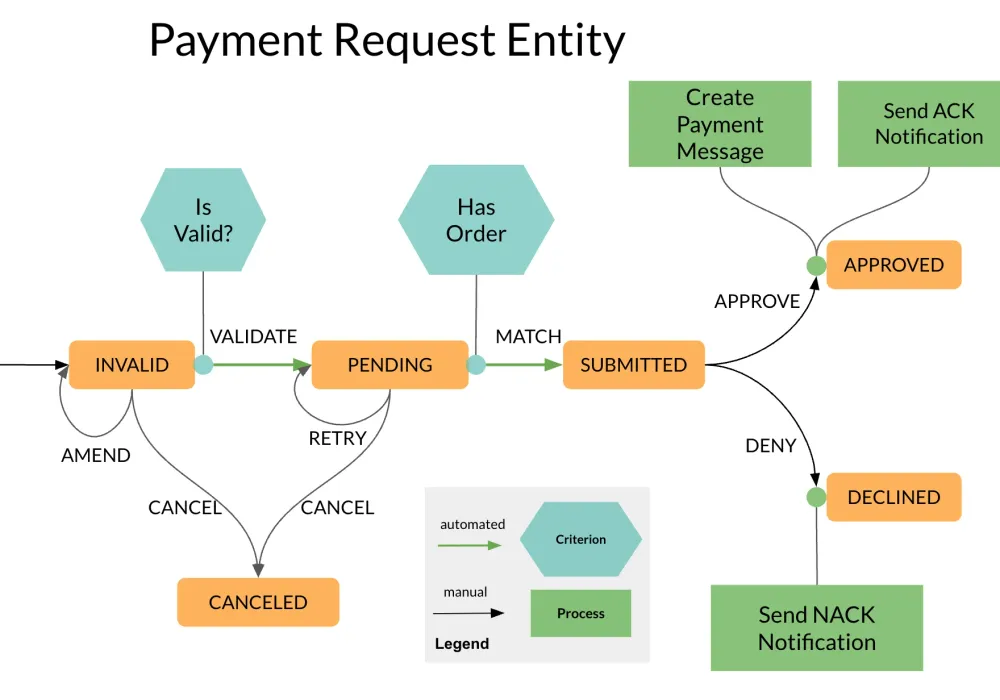
Step 1: Workflow Metadata
Section titled “Step 1: Workflow Metadata”{ "version": "1.4", "name": "Payment Request Workflow", "desc": "Payment request processing workflow with validation, approval, and notification states", "initialState": "INVALID", "active": true}Step 2: Define States and Transitions
Section titled “Step 2: Define States and Transitions”Start by defining the overall structure of states and transitions.
{ "version": "1.4", "name": "Payment Request Workflow", "desc": "Payment request processing workflow with validation, approval, and notification states", "initialState": "INVALID", "active": true, "states": { "INVALID": { "transitions": [ { "name": "VALIDATE", "next": "PENDING", "manual": false, "disabled": false }, { "name": "AMEND", "next": "INVALID", "manual": true, "disabled": false }, { "name": "CANCEL", "next": "CANCELED", "manual": true, "disabled": false } ] }, "PENDING": { "transitions": [ { "name": "MATCH", "next": "SUBMITTED", "manual": false, "disabled": false }, { "name": "RETRY", "next": "PENDING", "manual": true, "disabled": false }, { "name": "CANCEL", "next": "CANCELED", "manual": true, "disabled": false } ] }, "SUBMITTED": { "transitions": [ { "name": "APPROVE", "next": "APPROVED", "manual": true, "disabled": false }, { "name": "DENY", "next": "DECLINED", "manual": true, "disabled": false } ] }, "APPROVED": { "transitions": [] }, "DECLINED": { "transitions": [] }, "CANCELED": { "transitions": [] } }}Step 3: Add Criteria
Section titled “Step 3: Add Criteria”We add criteria to the VALIDATE and MATCH transitions:
{ "version": "1.4", "name": "Payment Request Workflow", "desc": "Payment request processing workflow with validation, approval, and notification states", "initialState": "INVALID", "active": true, "states": { "INVALID": { "transitions": [ { "name": "VALIDATE", "next": "PENDING", "manual": false, "disabled": false, "criterion": { "type": "function", "function": { "name": "IsValid", "config": { "attachEntity": true } } } }, { "name": "AMEND", "next": "INVALID", "manual": true, "disabled": false }, { "name": "CANCEL", "next": "CANCELED", "manual": true, "disabled": false } ] }, "PENDING": { "transitions": [ { "name": "MATCH", "next": "SUBMITTED", "manual": false, "disabled": false, "criterion": { "type": "function", "function": { "name": "HasOrder", "config": { "attachEntity": true } } } }, { "name": "RETRY", "next": "PENDING", "manual": true, "disabled": false }, { "name": "CANCEL", "next": "CANCELED", "manual": true, "disabled": false } ] }, "SUBMITTED": { "transitions": [ { "name": "APPROVE", "next": "APPROVED", "manual": true, "disabled": false }, { "name": "DENY", "next": "DECLINED", "manual": true, "disabled": false } ] }, "APPROVED": { "transitions": [] }, "DECLINED": { "transitions": [] }, "CANCELED": { "transitions": [] } }}Step 4: Add Processors
Section titled “Step 4: Add Processors”We add two processors to the APPROVE transition in the SUBMITTED state, respectively, to finish the job.
{ "version": "1.4", "name": "Payment Request Workflow", "desc": "Payment request processing workflow with validation, approval, and notification states", "initialState": "INVALID", "active": true, "states": { "INVALID": { "transitions": [ { "name": "VALIDATE", "next": "PENDING", "manual": false, "disabled": false, "criterion": { "type": "function", "function": { "name": "IsValid", "config": { "attachEntity": true } } } }, { "name": "AMEND", "next": "INVALID", "manual": true, "disabled": false }, { "name": "CANCEL", "next": "CANCELED", "manual": true, "disabled": false } ] }, "PENDING": { "transitions": [ { "name": "MATCH", "next": "SUBMITTED", "manual": false, "disabled": false, "criterion": { "type": "function", "function": { "name": "HasOrder", "config": { "attachEntity": true } } } }, { "name": "RETRY", "next": "PENDING", "manual": true, "disabled": false }, { "name": "CANCEL", "next": "CANCELED", "manual": true, "disabled": false } ] }, "SUBMITTED": { "transitions": [ { "name": "APPROVE", "next": "APPROVED", "manual": true, "disabled": false, "processors": [ { "type": "externalized", "name": "Create Payment Message", "executionMode": "ASYNC_NEW_TX", "config": { "attachEntity": true } }, { "type": "externalized", "name": "Send ACK Notification", "executionMode": "ASYNC_NEW_TX", "config": { "attachEntity": false } } ] }, { "name": "DENY", "next": "DECLINED", "manual": true, "disabled": false, "processors": [ { "type": "externalized", "name": "Send NACK Notification", "executionMode": "ASYNC_NEW_TX", "config": { "attachEntity": false } } ] } ] }, "APPROVED": { "transitions": [] }, "DECLINED": { "transitions": [] }, "CANCELED": { "transitions": [] } }}Best Practices
Section titled “Best Practices”- Use domain-specific state names
- Match transition granularity to business needs
- Define recovery and cancellation paths
- Prefer asynchronous processing for external dependencies
- Use self-transitions for triggering workflow automation on exit from the current state
Platform Integration
Section titled “Platform Integration”Cyoda workflows integrate directly with:
- Entity Models: Determine which workflows apply to which data types
- Execution Engine: Drives state and transition logic
- External Functions: Implement validation and custom behavior
- Event System: Triggers automated transitions on event reception